> ## Documentation Index
> Fetch the complete documentation index at: https://academy.pathfindr.ai/llms.txt
> Use this file to discover all available pages before exploring further.
# Create SharePoint Form
> A step-by-step guide to creating a SharePoint form that captures ideas and wins from champions.
After setting up your [Opportunity Tracker SharePoint List](/driver/toolsAndWorkspaces/aiOpportunityTracker/opportunityTrackerOverview), you can create a form to directly capture ideas and wins from champions.
## Why do this
Get structured input directly from form submissions.
Automate storage in SharePoint, ready for reporting or workflows.
Keep one source of truth across teams and departments.
## Step-by-step guide
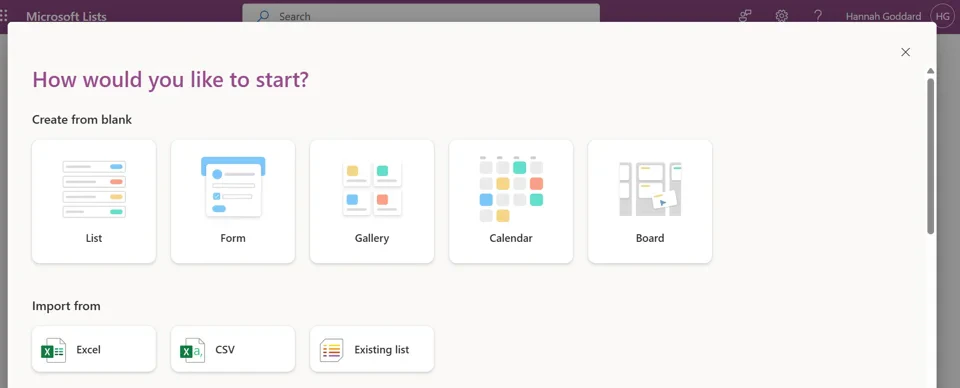
### Step 1: Click on the Forms link in your SharePoint list
 ### Step 2: Create a new form
 ### Step 3: Name your form and select what fields should be included
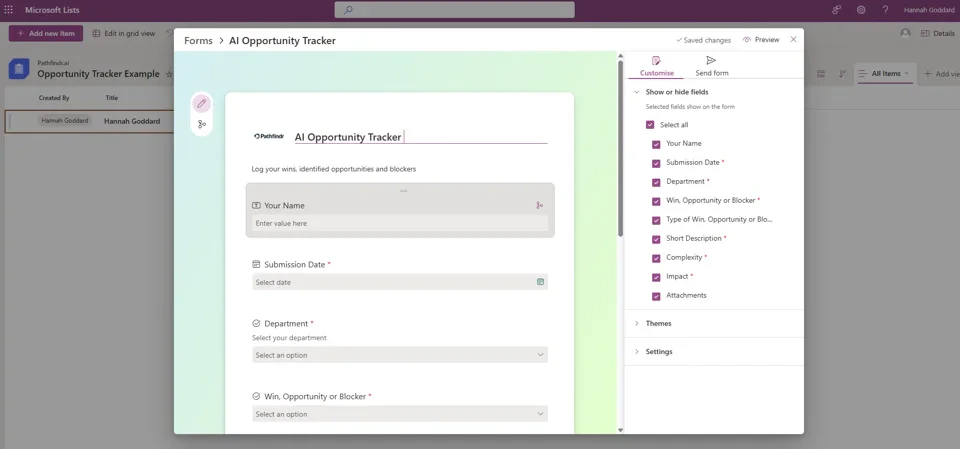
Keep the form simple to make submissions easy. Below are our recommended fields, but feel free to add your own if needed.
**User information**
* **Single line text** > Your Name > *Required*
* **Date and time** > Submission Date > *Required*
* **Choice** > Department (list all departments participating in Accelerator program) > *Required*
**Context for submission**
**Choice** > Win, Opportunity or Blocker > *Required*
This field categorizes the type of submission being made.
**Multi line text** > Short Description > *Required*
Provides context on the Win, Opportunity or Blocker.
**Choice** > Complexity (Low, Medium, High) > *Required*
Refers to how challenging the AI opportunity will be to implement:
* **Low** complexity opportunity is simple to execute with minimal technical setup or change management
* **Moderate** involves some integration or process adaptation
* **High** indicates significant technical, strategic, or organisational effort is required to bring the solution to life
**Choice** > Impact (Low, Medium, High) > *Required*
Measuring impact is about the intended outcomes and value creation:
* **Low impact** rating suggests limited or short-term influence, often confined to a small group or a single process
* **Medium impact** indicates meaningful, measurable improvement that benefits several areas or stakeholders
* **High impact** represents significant, sustained change — the kind that shifts performance, perception, or behaviour at scale
**Attachments** > *Optional*
Allow users to attach supporting files or documentation.
### Step 3: Name your form and select what fields should be included
Keep the form simple to make submissions easy. Below are our recommended fields, but feel free to add your own if needed.
**User information**
* **Single line text** > Your Name > *Required*
* **Date and time** > Submission Date > *Required*
* **Choice** > Department (list all departments participating in Accelerator program) > *Required*
**Context for submission**
**Choice** > Win, Opportunity or Blocker > *Required*
This field categorizes the type of submission being made.
**Multi line text** > Short Description > *Required*
Provides context on the Win, Opportunity or Blocker.
**Choice** > Complexity (Low, Medium, High) > *Required*
Refers to how challenging the AI opportunity will be to implement:
* **Low** complexity opportunity is simple to execute with minimal technical setup or change management
* **Moderate** involves some integration or process adaptation
* **High** indicates significant technical, strategic, or organisational effort is required to bring the solution to life
**Choice** > Impact (Low, Medium, High) > *Required*
Measuring impact is about the intended outcomes and value creation:
* **Low impact** rating suggests limited or short-term influence, often confined to a small group or a single process
* **Medium impact** indicates meaningful, measurable improvement that benefits several areas or stakeholders
* **High impact** represents significant, sustained change — the kind that shifts performance, perception, or behaviour at scale
**Attachments** > *Optional*
Allow users to attach supporting files or documentation.
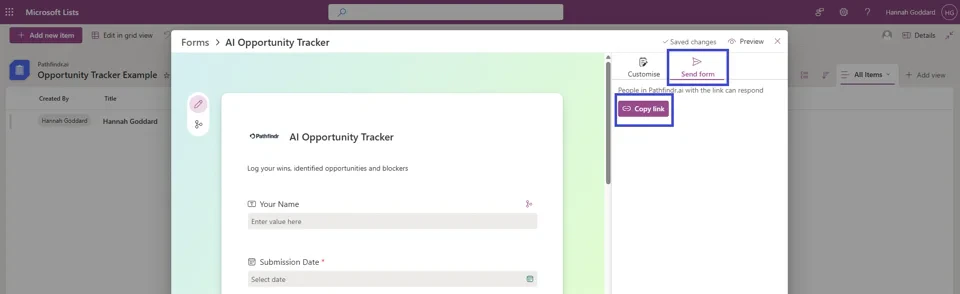
 ### Step 4: To share the form within your organisation, you can copy the link
 ***
## Next steps
Pin this link to your Champions Team Chat for easy access.
Set up a notification when a new opportunity or win is submitted.
*Read more*
***
## Next steps
Pin this link to your Champions Team Chat for easy access.
Set up a notification when a new opportunity or win is submitted.
*Read more*