

Introduction
This guide introduces you to AI agents through the lens of personal productivity rather than full scale task automation. You’ll learn about the current state of agent technology, explore OpenAI’s Agent Builder platform, and understand how Model Context Protocol is changing the way AI systems connect to your data. Creating personal assistants to help streamline and automate basic processes can be an incredible time saver if set up effectively.AI agents: Foundations
While the standard LLMs like ChatGPT, Copilot, Claude and Gemini are great for responding to prompts, Agents are capable of following more consistent instructions and independently performing actions (e.g. sending an email).Anatomy of AI agents
Foundational LLM (Brain)
The underlying AI model that powers the agent’s understanding and reasoning. This is the intelligence that interprets a request, and is available on normal chatbots (GPT-5, Gemini 2.5 Pro, Claude 4.5 Sonnet, etc.).
Data (Knowledge)
The documents, files, and information you provide. Data you provide becomes the foundation of your agent’s knowledge base, and directly influences your results.
Tools (Capabilities)
The actions your agent can perform. These might include checking calendars, searching documents, sending emails, updating records, or accessing external systems.
Rules (Guardrails)
Instructions you design that guide behaviour, tone, and functionality. These define what your agent should and shouldn’t do, how it should communicate, and the constraints it must follow.
Understanding agent tools
Tools are really what makes agents come to life. Giving Tools to AI helps bridge the gap between a chatbot that simply knows what to do, and a chatbot that knows what to do plus the ability to do it for you. These tools will typically fall in one of two categories:- Connected assistants
- Agentic assistants (MCP)
The basic ability to retrieve data from services like Outlook, Gmail, or Drive and retrieve information. These tools can fetch data, but are unable to take action on the connected platform.Example: Customer service AI agent that reads a customer’s email and drafts a response in ChatGPT.
Current agent landscape
Over the past few years, there has been a considerable increase in the number of companies offering AI Agent solutions. Some of the popular platforms include: N8N, Zapier, OpenAI Agent Builder, Make, Copilot Studio Advanced, and many more.
What works best is picking one agent automation tool, and using it to solve a simple problem you face on a daily or weekly basis. Once you have tested and verified your automation works, additional involvement from a more technical team may be required to scale.
Use cases: AI agents
Given the rise of this technology, you can now build assistants that previously required engineering resources. The opportunity for AI agents is practical, accessible, and delivers tangible results when used to solve simple and repetitive tasks. Some simple use cases you could use agents for include:Email management
Respond to customer emails, saving responses as drafts.
Calendar organisation
Organising your calendar for the day.
Task aggregation
Creating a to-do list by connecting to Email, Slack, Teams, etc.
Web monitoring
Track data from specific websites and deliver weekly findings.
CRM notifications
Tracking a CRM to notify a sales rep once a lead has been added.
Masterclass build: Summary
This build session explored creating a personal AI agent capable of autonomously managing your daily schedule. The agent reads tasks from a Notion database, checks your calendar for available time slots, and automatically schedules tasks based on priority and duration. Whilst this specific example focused on task scheduling, the learnings from this session could be applied to any other automation scenario.Custom GPT With Zapier Actions
During the session, we compared two approaches starting with a lightweight Custom GPT connected to Zapier Actions. This method involved creating a custom GPT with specific instructions, and defining its role as a Daily Task Scheduler. Zapier Actions provided the bridge between the custom GPT and external applications (e.g. Calendar & Notion). However, this approach required manual approval at each step, making it somewhat hands-on rather than truly autonomous.
N8N agent automation
The more powerful solution used N8N, a visual workflow automation platform, paired with OpenAI’s GPT-5 model via API. The workflow centred around an AI Agent Node that was designed to fetch all calendar events for the day, identify busy periods, query Notion for incomplete tasks, and automatically create calendar events upon confirmation. The Zapier MCP Server was used to connect to Notion and Google Calendar. Lastly, N8N’s Memory Node allowed the agent to maintain conversation memory throughout the process.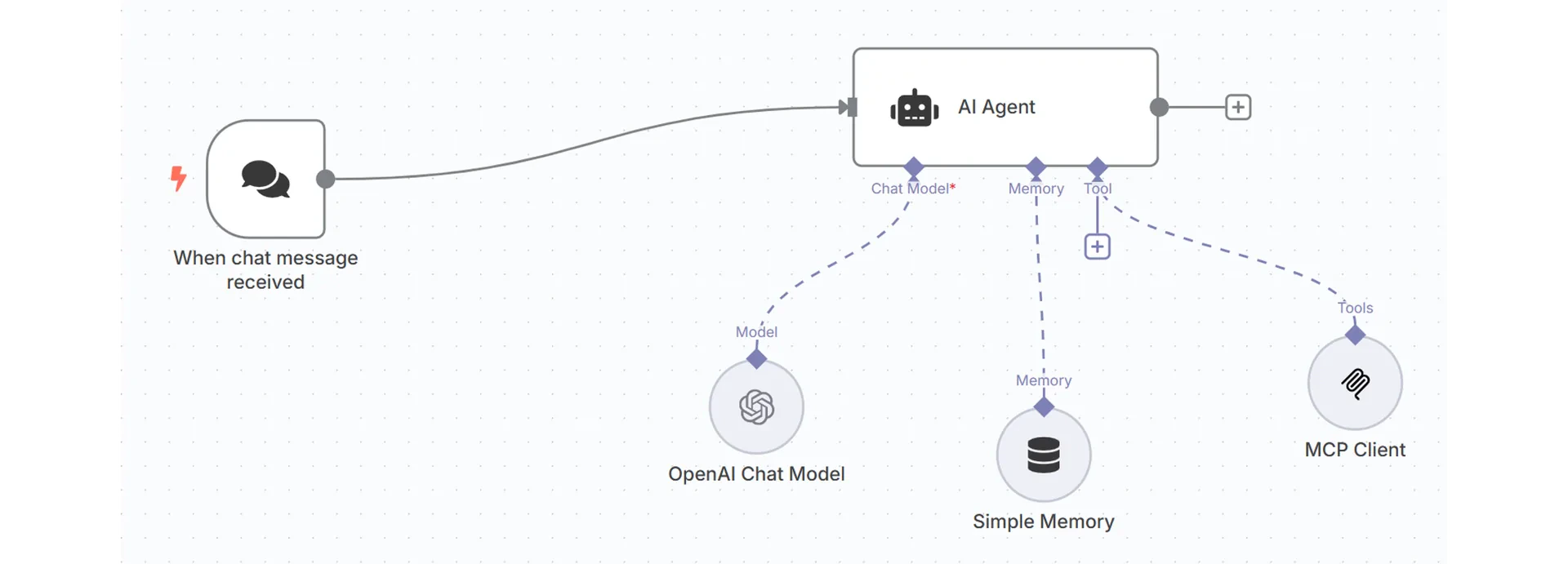
OpenAI Agent Builder
Similar to N8N, Agent Builder is a visual canvas where you construct AI agents via a simple node interface. The setup here is very similar to the N8N example, with a combination of agent instructions, model selection, chat history (memory) and Zapier MCP.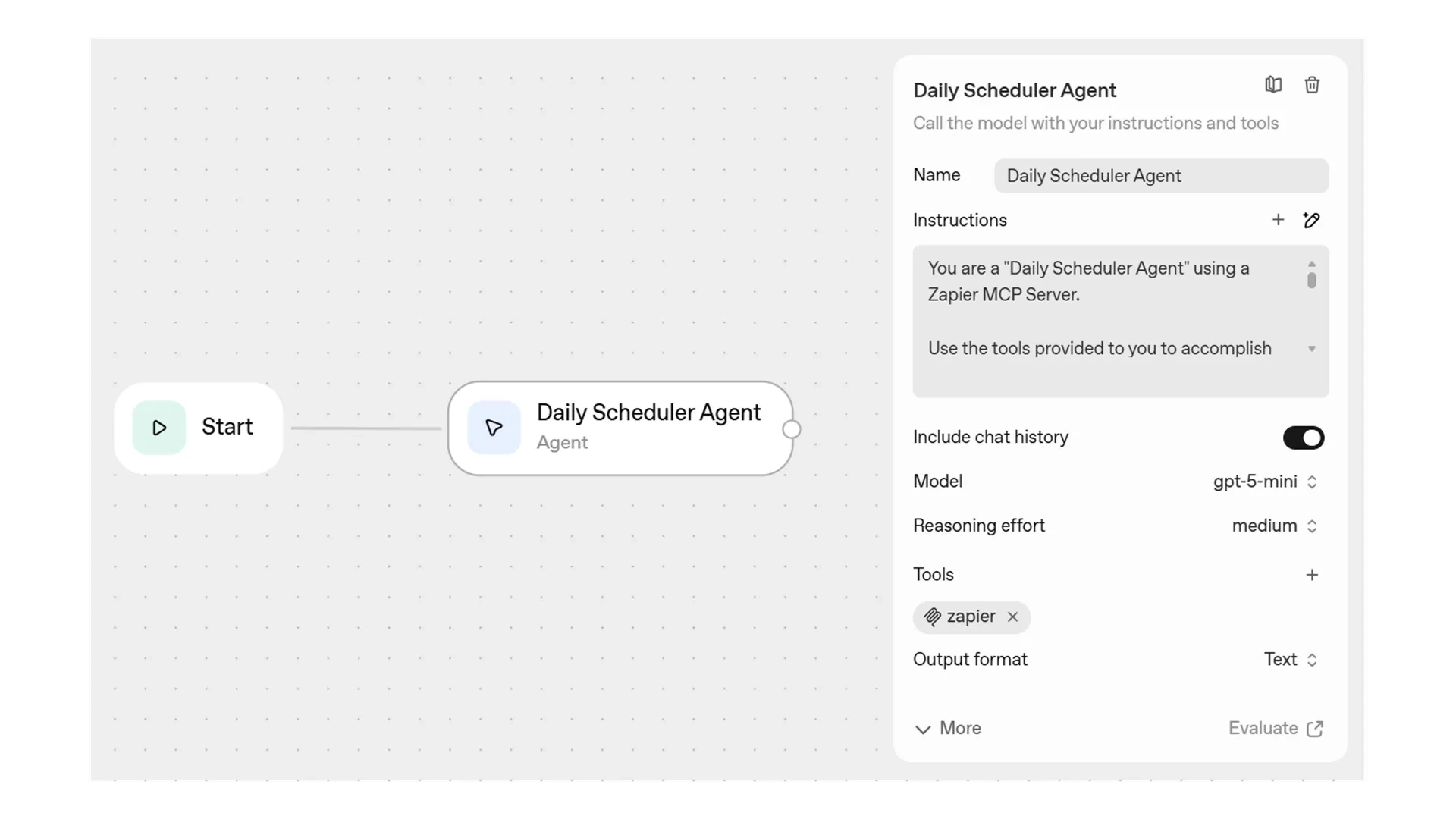
Reality of building AI agents
Contrary to popular online beliefs, building even simple AI agents is an iterative process that demands patience for debugging and refinement. Nevertheless, once an automation is established, the development of your agent-building skills will enable you to reliably automate a wide array of tasks.Masterclass build: Create your own
Custom GPT system instructions
N8N automation system instructions
OpenAI Agent Builder system instructions
Quick reference
What are AI agents?
Intelligent assistants that understand requests AND take actions autonomously. Unlike chatbots, agents can send emails, create calendar events, and interact with external systems.Brain
The AI model (e.g. GPT-5 mini, Claude 4.5 Sonnet, Gemini 2.5 Pro).
Knowledge
Documents and information provided.
Tools
Actions the agent can perform.
Rules
Instructions defining behaviour and constraints.
Agent tools
Connected assistants
Read data from services but cannot take actions.
Agentic assistants (MCP)
Read data AND perform actions automatically. Model Context Protocol enables non-technical users to build and use this.
Masterclass demo builds
Custom GPT + Zapier
Simple setup but requires manual approval at each step.
N8N & OpenAI Agent Builder
Visual workflow platforms enabling fully autonomous execution with memory and tool connections.
Quick start challenge: Build a custom GPT
Time: 15–20 minutesGoal: Design a custom GPT as if it were a real person with a clear role, personality, and job.
1. Define the GPT’s job
Start by choosing a real task from your work that is manual, repetitive, or slow — something you’d like to automate. Decide:- What problem will your GPT help with?
- Who will use it?
- What specific tasks should it handle?
2. Create the persona
Imagine your GPT as a person. Define:- Tone and personality
- Expertise level
- How it should communicate and behave
3. Map inputs and outputs
Be specific about what good output looks like. Determine:- What information will users provide?
- What should the GPT produce, for example summaries, drafts, recommendations, or action steps?
4. Write the core instructions
Agree on the rules your GPT follows. Keep these clear and behaviour focused.- What it must do
- What it must not do
5. Pick a signature example and share back
Choose one scenario your GPT should excel at that connects to the task you selected.Example: “Turn messy meeting notes into a clean summary with actions.”